I got to and did a bit more work on the keypad.
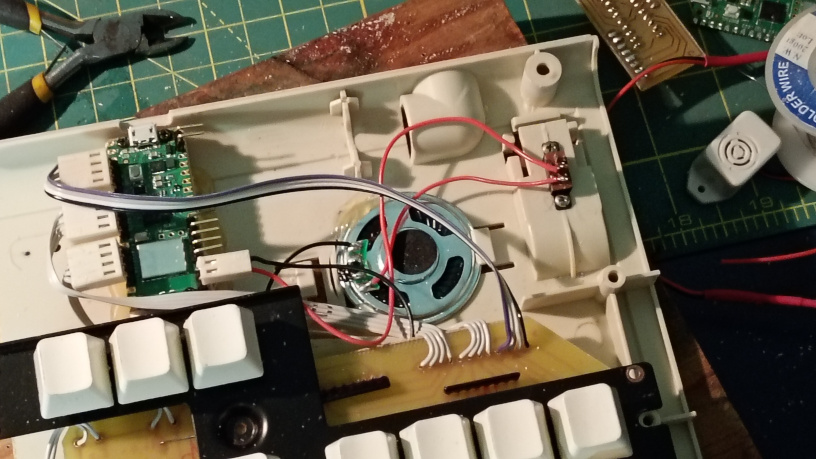
Here you can see the inside of the keypad with the speaker switch in the top right corner of the case.
It fitted nicely into the recess where the original keyboard’s legs would have been, so from the outside it’s out of sight unless you turn the keypad over.
I had a bit of a problem with it. I’d found a little slide switch, marked it out, drilled and filed a slot for the switch slider and, importantly, tested that the switch worked.
After soldering the switch in and testing the continuity, I fitted the switch, closed up the case and plugged it in. No audio.
I tried the switch in a couple of positions but still no audio and when I tested the continuity, well there was none. All the solder joints checked out but the switch wasn’t contacting.
So I found another switch, tested it, replaced the switch and plugged it in. No audio. Weird.
I began to suspect the culprit wasn’t the switch and unmounted it. Sure enough, the slider was not fully in the on position and when I slid it across all the way I got a good continuity reading.
Turns out that the slot was too short on one end and the switch wasn’t closing. A little bit of work with a file sorted that out and now I can switch the beeps and boops on or off as needed.
The other thing I figured out was the USB storage that I wanted to not show up by default. I read online that there was a way, but after adding the code to read a button and optionally turn off the storage, it didn’t work.
Going back to the actual reference page for the storage module I discovered that the test should be done in a different file. I copied the code into boot.py and it worked – the drive didn’t show up on boot.
I was all set to try adding a pushbutton to the case but noticed that the keypad already had a pile of buttons masquerading as keys. Instead of adding another button, which would have meant changing a connector, adding some header pins and drilling a hole etc, in boot.py I hard coded a read of the Enter switch by setting the row as the input and the column as an output pulled to logic low.
Now, the storage medium can be mounted by holding down the Enter key while the keypad is being plugged in. Which is a lie, because I immediately changed it to the pause/break key because using Enter meant that the Enter key was being pressed when the keypad finished booting.
Actually, what I’ll do is add another test to pause boot.py until the key is released before exiting. That’s sensible.
Originally written September 30, 2025